
Automatic deadend selection starts with the conductor
Choosing an automatic deadend starts with identifying the conductor and the connection it must make. A useful selection record includes conductor family, nominal size, strand construction, outside diameter and the hardware interface. A catalogue match is a candidate for review; the supplier should confirm the exact combination before the order is released.
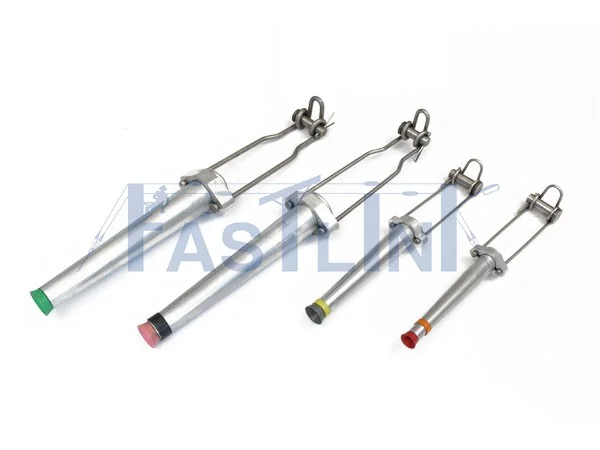
This matters when a project includes several conductor types, replacement work or drawings that identify only a nominal size. An item that looks similar to an existing fitting may have a different conductor range or attachment arrangement. Resolve those differences while comparing quotations, when corrections are easier to manage than after delivery.
The FASTLINK automatic conductor deadend product page is the starting point for reviewing the product family. The supplied specification table lists selections under ACSR, AAC and AAAC, together with outside-diameter ranges, colour codes and three bail arrangements. Use those fields together rather than selecting from a product photograph alone.
Identify the actual conductor construction
For each line item, copy the conductor designation from an approved drawing, purchase specification or conductor manufacturer's data sheet. Keep the original units and include the construction information given by that source. If the drawing and the material on site disagree, record the discrepancy and resolve it before choosing a connector.
Do not treat a nominal size as a complete conductor description. The FASTLINK table separates conductor families and includes construction notation in some entries. That is a reason to preserve the complete designation when asking for a recommendation, rather than shortening everything to a single number.
A photograph of a reel label can help establish what was supplied, but it should accompany readable technical information. Where a conductor is existing or unidentified, ask the responsible project engineer how its identity and condition should be established. Avoid sending a supplier an estimated size without clearly marking it as unconfirmed.
For projects with multiple circuits, create a separate row for each conductor construction. Combining several conductors into one purchasing description can conceal differences that need separate model confirmation. A small amount of organisation here makes the supplier's response much easier to check.
Use outside diameter as a separate selection check
The supplied FASTLINK table includes minimum and maximum conductor outside diameters. Record the applicable diameter alongside the nominal size and conductor family. Treat these as separate checks: finding a diameter inside a listed range does not, by itself, resolve whether the conductor construction is approved for that model.
For new conductor, begin with its technical data sheet. If field measurements are necessary, have qualified personnel obtain them under the project's approved procedures. Ask the supplier how to handle a value close to a listed limit, an uncertain measurement or a difference between catalogue information and the conductor documentation.
Keep units visible throughout the enquiry. The supplied table presents inch and millimetre dimensions, so a copied number without its unit can create ambiguity. Where different documents use different units, retain the original value and label any conversion rather than silently replacing it.
Do not resolve unclear catalogue footnotes by guessing. Some entries in the supplied table contain asterisks without an accompanying explanation in the image. For those entries, request the complete current table or written confirmation of the intended conductor combination. An unresolved note belongs on the enquiry checklist, not in an assumed compatibility statement.
Match the bail arrangement to the connection
Conductor compatibility is only part of the selection. The other end of the assembly must suit the project's attachment arrangement. The supplied specification image identifies Z Bail, Clevis Bail and Flex Bail versions, with catalogue-number suffixes ZB, CB and FB respectively.
Z Bail: Connection drawing, required clearances and the intended mating hardware
Clevis Bail: Mating connection details, pin-related requirements and the approved assembly drawing
Flex Bail: Attachment geometry, available space and the specified connection arrangement
These are enquiry inputs, not a rule that one bail style is universally preferable. Ask the supplier to review the intended assembly rather than selecting a style only because it resembles a previous purchase. The project may impose constraints that are not visible in an isolated product image.
The table also labels dimensions A, B and C. Compare each dimension with the drawing for the relevant arrangement. A blank field should not be treated as zero or copied from a neighbouring model. Obtain the model-specific drawing when clearance or interface dimensions are important to the purchase decision.
Use colour coding to support identification
Colour codes appear beside the conductor ranges in the supplied table. They can be included in a purchasing or receiving record, but retain the catalogue number and conductor details as well. Colour alone is an incomplete description for an enquiry, particularly when different product arrangements are being discussed.
An effective line item brings the information together: proposed catalogue number, conductor family, complete size designation, diameter, bail arrangement and quantity. Add the colour code as a cross-check if the current supplier documentation confirms it. This gives the supplier a specific selection to accept or correct.
The same record can later support receiving inspection. Purchasing and site teams should be able to compare the delivered identification with the approved order without reconstructing the decision from emails. If a supplier proposes a substitute, ask for a revised written match rather than relying on an informal assurance of equivalence.
Check the evidence behind the selected model
Once a candidate model is identified, review the supporting documents. A specification table describes a selection range; it does not replace a model-specific test report or establish every performance requirement in a project specification. Keep compatibility review and performance review visible as separate steps.
Ask which report, drawing revision and installation instruction apply to the proposed item. Where a report concerns another model or product family, request a documented explanation of its relevance. Similar appearance, a shared manufacturer or a common product label is not enough to establish the scope of a test result.
For a related visual reference, watch this automatic connector video on YouTube. Confirm the demonstrated product with FASTLINK before applying any shown technique to your selected deadend.
For a structured way to review these documents, use the automatic deadend supplier evaluation guide. It explains how to compare evidence without turning an incomplete certificate package into an unsupported approval.
Prepare a selection record that purchasing can use
Before requesting a quotation, check that the following information is available or explicitly marked for confirmation:
• Conductor manufacturer and complete designation.
• Conductor family, nominal size and strand construction.
• Outside diameter, units and the document used as the source.
• Proposed deadend catalogue number and bail arrangement.
• Connection drawing, mating hardware and relevant space constraints.
• Project requirements that the supplier must review.
• Quantity for each distinct conductor and connection combination.
• Missing documents, unclear footnotes or unresolved differences.
Do not delay an initial enquiry simply because every field is not final. Instead, distinguish confirmed information from assumptions and request a response against each open item. This helps the supplier explain what can be quoted immediately and what requires further technical review.
The automatic deadend RFQ checklist turns this selection record into a quotation request, including document deliverables and a clear way to identify proposed alternatives.
To discuss a FASTLINK selection, send your conductor data sheet, connection drawing and required quantities through the enquiry route on the automatic conductor deadend page. Ask for written confirmation of the proposed catalogue number and any conditions that remain open before ordering.